
Getting Started in Bloxian Business
First-hour walkthrough for the Bloxico branch loop, badges, and early profit.
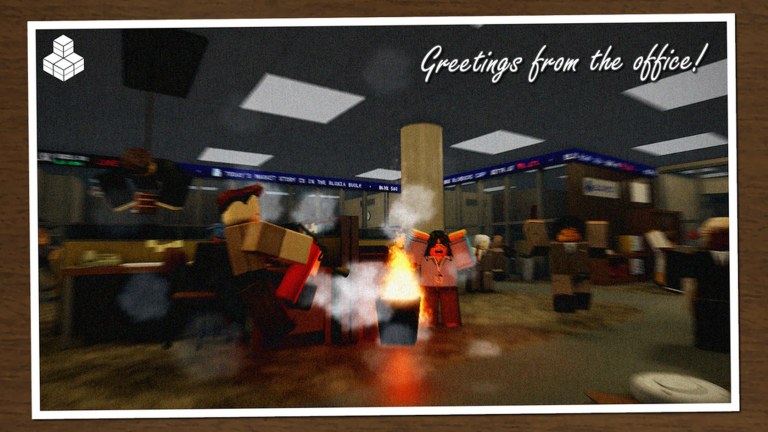
Bloxian Business is a Roblox simulation and tycoon game by nautisaurus where you help run a new Bloxico branch. Servers hold up to nine players, so you can invite as many as eight friends and share the workload. The pitch is simple: complete tasks and events, turn that work into profit and upgrades, climb ranks to earn better paychecks, then buy and decorate the office until the branch looks like a place worth defending.
This guide is your day-one checklist. It assumes you have never opened the place before. By the end you should understand the core loop, know where to look for missions, claim your first paycheck habits, and know which wiki pages to open next. For a visual run-through, watch the embedded CHALLS guide mid-page—then come back here for the written checklist you can skim between sessions.
Before you join
- Open the official place from Official Links or your Roblox favorites so you always land on the correct experience (Universe ID 10515285860).
- Decide whether you want a quiet private vibe with friends or a public lobby. Public servers are fine for learning; private servers shine once your group knows roles (see Co-op With Friends).
- If you subscribe to Roblox Plus, remember the in-game perks: 5% paycheck earnings and one mission swap per day. Those bonuses matter more after you have a stable paycheck rhythm, but they help from the first hour.
- Skim Codes once. As of November 2026 research there are no verified public promo codes—do not waste time hunting fake lists on random sites.
First minutes in the office
When you load in, treat the branch like a real workplace orientation:
- Look for tutorial prompts and interactables. Early objectives teach movement, task claiming, and where progress UI lives. Do not skip them just to wander.
- Earn the freebie badge “A Candidate for Intern”. It welcomes players who make it through the interview flavor of onboarding. Completing it confirms you are past the absolute front door of the experience.
- Learn the four pillars printed on the game page: Complete Tasks & Events, Profit & Upgrade, Rank & Earn, Buy & Decorate. Every later guide on this wiki maps to one of those pillars.
- Find the task or mission board (or equivalent UI) before decorating. Pretty furniture feels good, but unpaid work does not grow the branch.
If the camera or menus feel awkward on your device, pause and open Controls & UI so you stop fighting inputs.
The core loop in plain language
Think of every session as a short workday:
- Claim or accept available tasks and events. Events interrupt the routine—treat them as high priority because they often gate seasonal progress or bonus rewards.
- Complete the work efficiently. Pathing matters. Batch nearby objectives instead of zigzagging across the floor. Details live in Complete Tasks & Events.
- Collect profit and invest in upgrades. Upgrades that speed work or unlock new areas usually beat cosmetic impulse buys early on.
- Watch rank and paycheck growth. Higher ranks make the same effort worth more. Strategy for promotions is in Rank & Earn.
- Spend surplus on furniture and decoration once the productive upgrades are covered—see Decorate Your Office.
Repeat. The game text jokes that there is somehow always another task. That is the joke and the design: momentum beats perfection.
First-hour priorities (solo or duo)
If you are alone or with one friend, keep the plan tight:
- Finish every obvious tutorial or onboarding task before exploring side rooms for fun.
- Prefer tasks you can finish without waiting on other players.
- Claim paychecks on a rhythm instead of ignoring the economy UI until you are broke.
- Save early currency for upgrades that unlock smoother task flow; delay luxury decor.
- Note which interactables conflict when two people touch them—this foreshadows co-op role splits later.
When a third friend joins, stop stacking the same chore. Assign one person to roaming events, one to desk or floor tasks, and one to spotting upgrade opportunities. Full role guides are on the co-op page.
Paychecks, Plus, and honest expectations
Paychecks are the heartbeat of progression. Treat them like scheduled income:
- Check when the next paycheck lands so you are not AFK during claim windows if the game requires interaction.
- Roblox Plus adds 5% paycheck earnings—a quiet compound advantage over long grinds.
- The daily mission swap from Plus is best used on awkward or travel-heavy missions, not on easy tasks you can finish in seconds.
- Do not expect promo-code windfalls. Keep Codes bookmarked for future drops, but build your plan around gameplay earnings.
Exact dollar amounts and rank titles can shift with patches. Use live UI numbers as truth; use this wiki for workflow.
Badges and early goals
Two badges matter for new players as of the November 2026 snapshot:
- A Candidate for Intern — freebie onboarding badge; earn it during early play.
- Halloween 2026 — seasonal participation badge from the Halloween event. If the event is still active when you join, follow Halloween 2026 Event. If it has ended, watch Updates for the next seasonal replacement.
Full badge checklist and tracking tips live on Badges. Badges are motivation and proof of participation. They are not a substitute for rank progression, but they are nice milestones for your Roblox profile.
What to open after this page
Recommended path after your first successful paycheck:
- Complete Tasks & Events — efficiency habits.
- Rank & Earn — promotion mindset and the SirNeble grind video.
- Get Promoted Fast — session templates when the ladder feels slow.
- Decorate Your Office — spending rules once profit is stable.
- Co-op With Friends — before you fill an eight-friend lobby.
- Tier List — upgrade priority opinions when you have choices.
- Badges — Intern, Halloween, and how to track the next drop.
- Players — community highlights and notable office runs.
- Scripts — read the safety hub; do not risk your account on unverified executors.
Common beginner mistakes
- Decorating first. A stylish empty pipeline still fails deadlines.
- Ignoring events. Seasonal and timed events often carry unique rewards or badges.
- Everyone grabbing the same task. In a full lobby this creates queues and frustration.
- Chasing fake codes or scripts. Unverified lists waste time and can be malicious—stay on this wiki’s Codes and Scripts pages for honest status.
- Never checking Updates. A patch can change mission flow; skim Updates after downtime.
Session checklist you can reuse
Copy this mental list every time you clock in:
- Join the correct place and greet coworkers in chat or Discord.
- Check active tasks and any event banner.
- Clear high-priority or time-sensitive work first.
- Claim paycheck / note Plus swap availability.
- Buy one meaningful upgrade if you can afford it.
- Optionally place one decor item that does not block paths.
- Before logout, leave the branch better than you found it so the next session starts clean.
You do not need perfect optimization on day one. You need a repeatable habit: tasks → profit → rank → thoughtful spending. Once that habit sticks, Bloxian Business becomes the co-op office sim it was designed to be—long hours, high expectations, and a branch that finally looks like success.
Frequently Asked Questions
Quick answers for Bloxico branch managers.
What is Bloxian Business about?
It is a Roblox co-op office simulation and tycoon by nautisaurus. Up to nine players manage a Bloxico branch by completing tasks and events, upgrading, ranking up for paychecks, and decorating.
How do I get the Intern badge?
Play through the early onboarding and interview-style introduction. The freebie badge A Candidate for Intern is awarded as you enter the candidate pipeline.
Are there working promo codes right now?
As of November 2026 research, no verified public promo codes were found. Check the Codes hub for updates instead of random third-party lists.
Should I buy Roblox Plus for this game?
Plus is optional. If you already have it, use the 5% paycheck boost and the daily mission swap. They help long sessions but are not required to enjoy the loop.
What should I do after the tutorial?
Focus on task efficiency, claim paychecks regularly, invest in productive upgrades before luxury decor, then read Rank & Earn and Co-op With Friends.