
Bloxian Business Buy & Decorate the Bloxico Branch
Furniture, upgrades, and layout tips that make the office productive and proud.
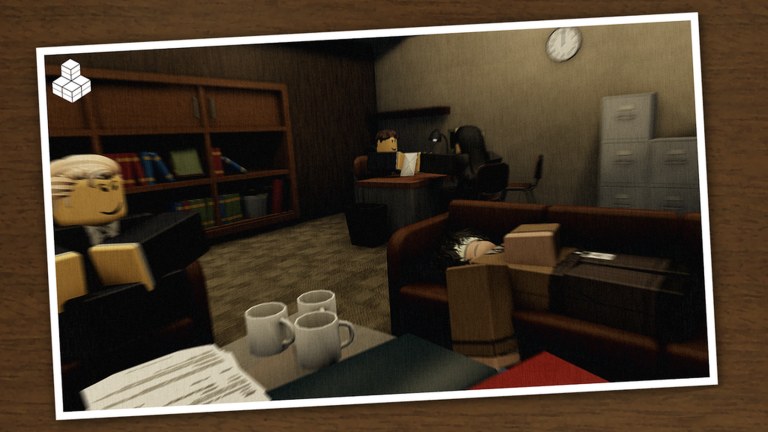
Buy & Decorate is the victory lap of the Bloxian Business loop—and the easiest way to go broke if you treat it like a shopping spree. The Bloxico branch is meant to look better over time: new furniture, cleaner layouts, and upgrades that show your friends the company is winning. This guide teaches a spending order that protects rank progress while still letting the office feel personal.
If paychecks still feel tiny, park this page and finish Rank & Earn plus Complete Tasks & Events first. Decoration shine when the pipeline already works.
The spending order that keeps branches alive
Use this sequence every time a paycheck lands:
- Progression unlocks that open new work, speed tasks, or remove obvious friction.
- Quality-of-life upgrades that reduce walking, waiting, or UI pain.
- Functional furniture that marks zones (reception, break area, manager desk) without blocking paths.
- Pure cosmetics that exist for vibe screenshots and Discord flexes.
When two items seem equal, check community opinions on the Tier List and live patch notes on Updates. We will not invent fake price tags here; the shop UI is the source of truth for costs.
Functional decor versus vanity decor
Functional decor supports the fantasy of a working office and often helps navigation. Think clear desks near task clusters, plants that do not clip doorways, storage that signals “this is the supply wing,” and lighting that makes markers easier to see on darker maps.
Vanity decor is the neon sign, the meme prop, the oversized trophy. Buy it when:
- You already hit your session’s upgrade goal.
- Paths remain wide enough for nine players to pathfind.
- The item does not hide interactables or camera angles critical for tasks.
A beautiful maze that traps coworkers is a failed renovation.
Layout principles for co-op offices
Servers hold up to nine people. Layouts must assume crowds:
- Keep main corridors two characters wide at minimum so runners can pass.
- Pull furniture off door swing areas and stair landings.
- Cluster same-role props so specialists can camp a zone without crossing the whole map (see Co-op With Friends).
- Leave event space. Seasonal events may spawn temporary objects—do not fill every tile before Halloween-style content drops.
- Create a meetup spot. A lobby couch or reception desk becomes the natural rally point when chat says “group on me.”
If your group uses Discord voice, call renovations during quiet minutes after a paycheck, not mid-event. Links live on Official Links.
Budgeting without exact spreadsheet numbers
Because prices change, budget in ratios instead of invented currencies:
- Tier A — Must buy soon: anything the UI frames as an unlock for progression.
- Tier B — Strong convenience: items that obviously shorten routes or clarify zones.
- Tier C — Nice flex: cosmetics you have wanted for more than one session.
- Tier D — Impulse: things you noticed thirty seconds ago.
Rule of thumb: never buy Tier D until Tier A is empty and you still have a buffer for the next paycheck cycle. If a purchase would leave you unable to afford an obvious upgrade that appears tomorrow, wait.
Roblox Plus players with the 5% paycheck boost will fill Tier B faster; still follow the same order so the bonus does not become pure vanity fuel.
Renovation workflow (solo)
- Clear urgent tasks so the board is calm.
- Claim paycheck.
- Open the buy/decorate UI and filter for upgrades first.
- Place one structural change (desk row, divider, lighting).
- Walk the common task route once to confirm nothing is blocked.
- Screenshot for Discord if you are proud—then return to tasks.
Do not renovate for an entire hour while events expire. Decoration are the dessert course.
Renovation workflow (friends)
- Elect a temporary designer so five people do not fight the same placement ghost.
- Others keep clearing tasks to fund the designer.
- Rotate the designer role next session so everyone gets creative time.
- Agree on a theme (clean corporate, chaotic startup, spooky seasonal) before placing twenty clashing props.
Seasonal themes pair well with event guides like Halloween 2026 Event.
How decorating supports the other pillars
- Tasks: Clear sightlines and labeled zones make objectives faster to spot—pair with Controls & UI if markers still hide.
- Rank: Resist spending the promotion budget on couches; read Rank & Earn when tempted.
- Events: Leave open floor for temporary content; cluttered maps make event objectives harder.
- Retention: Friends stay longer in offices that feel owned. A cared-for branch is free marketing for your private lobby.
Common decorating mistakes
- Buying furniture before understanding the task loop (Getting Started).
- Blocking the highest-traffic hallway with a “feature piece.”
- Filling every grid cell so events cannot breathe.
- Letting four players edit placements at once until the office looks random.
- Ignoring Updates after a patch rearranges rooms—old layouts may no longer fit.
- Hoping codes will fund a luxury remodel—Codes may have nothing active; earn it.
- Looking for decorate-bot scripts—none were verified publicly for this game as of November 2026; see Scripts.
Aesthetic ideas that still play well
Without prescribing unpaid assets, aim for readable themes:
- Clean corporate: aligned desks, limited color palette, clear reception.
- Creative studio: softer seating near low-traffic walls, still keeping center lanes open.
- Night-shift ops: brighter lights on task clusters, darker lounge corners.
- Seasonal overlay: temporary props around the edges during events, removed afterward.
Whatever theme you pick, walk it as if you were a new hire. If you get lost, guests will too.
Aftercare: maintain the office
Decoration is not one-and-done:
- After big upgrades, re-check pathing.
- After events, remove leftover seasonal clutter if it blocks work.
- After recruiting new friends, give a thirty-second tour of zones.
- After a profit drought, pause cosmetics until ranks recover.
Browse Players for inspiration from notable runs, then remix—do not copy layouts that only work in empty servers.
Quick buy checklist
- Is this Tier A progression? Buy.
- Does it block a door, stair, or event tile? Skip or reposition.
- Will nine players still path? Test.
- Do we still have a paycheck buffer? Good.
- Are teammates okay with the theme? Confirm.
- Did we clear tasks before a long decorate session? Yes—then place with confidence.
Master Buy & Decorate and the branch stops feeling like a tutorial warehouse. It becomes your Bloxico office—profitable, ranked, and worth showing off on the Guides Hub journey from first task to full renovation.
Frequently Asked Questions
Quick answers for Bloxico branch managers.
Should I decorate on day one?
Place only what helps navigation. Save vanity furniture until productive upgrades and a stable paycheck habit are in place.
Why do my friends keep getting stuck after I decorate?
You likely blocked a corridor, stair, or interactable. Widen paths and test routes with a full lobby mindset.
How do I decide between two upgrades?
Prefer the one that reduces task friction or unlocks progression. Check the Tier List and live prices in-game—do not trust guessed spreadsheets.
Can I theme the office for Halloween?
Yes, but keep event space open and remove clutter afterward. See the Halloween 2026 Event guide for seasonal participation tips.
Who should place furniture in a co-op lobby?
Pick one temporary designer while others earn. Rotate next session so everyone gets a turn without placement fights.