
Bloxian Business Complete Tasks & Events Efficiently
Turn the endless office to-do list into steady profit without wasted walking.
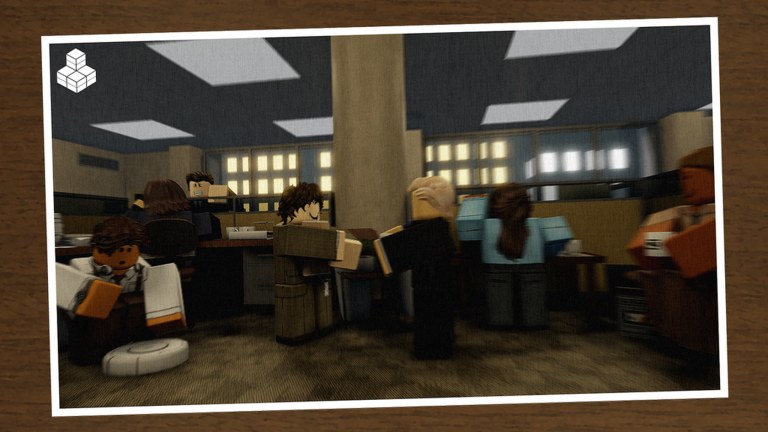
The official Bloxian Business pitch leads with Complete Tasks & Events—and for good reason. Everything else in the Bloxico branch (profit, upgrades, ranks, decoration) depends on clearing work cleanly. This guide shows how to treat the office like a logistics puzzle: pick the right jobs, route them smartly, respect event interruptions, and coordinate with friends so the server of up to nine players does not trip over itself.
If you are brand new, skim Getting Started first. If you already understand paychecks and promotions, pair this page with Rank & Earn so efficiency converts into lasting income.
What “tasks” and “events” mean in practice
Tasks are the everyday assignments that keep the branch running—deliveries, desk work, maintenance-style chores, customer or coworker requests, and whatever the current build surfaces as interactable objectives. They are the steady XP and profit engine.
Events are the disruptions and special scenarios layered on top of the routine. They may be timed, seasonal, or random branch incidents. Events often carry better visibility, unique rewards, or badge progress (see Halloween 2026 Event). When an event banner appears, treat it as a soft interrupt: finish the current micro-step if you are mid-animation, then pivot.
You do not need a spreadsheet of every objective name. You need a priority stack:
- Time-sensitive or seasonal events
- Tasks that unlock progression gates or upgrades
- High-density task clusters near your current position
- Lonely low-value chores on the far side of the map (save for dead time)
Build a routing habit
Most time loss in office sims is walking. Adopt these rules:
- Scan before you sprint. Open the task list or markers and identify two or three objectives in the same wing before you move.
- Clear a wing, then rotate. Finish the cluster on Floor A / Zone A before crossing to the opposite side.
- Carry context. If a task sends you to a room, glance for a second interactable before you leave.
- Avoid ping-pong. Do not accept two jobs that force opposite corners unless the payout clearly justifies the travel.
- Use vertical thinking. If the office has stairs or multiple levels, finish one level’s visible work before changing floors.
These habits matter even more in a full lobby where pathing collisions and contested props slow everyone down. Role ideas live in Co-op With Friends.
Event handling without panic
Events exist to break autopilot. Handle them like this:
- Announce in chat when an event starts so coworkers stop stacking trivial tasks.
- Send the closest player unless the event needs a specific role or item.
- Park non-critical tasks instead of abandoning them mid-progress if the game tracks partial completion poorly—finish the last click, then go.
- Watch for seasonal UI. Halloween and similar events may add temporary objectives; missing them can mean missing badges.
- After the event, immediately re-scan the normal board. Branches often refill with catch-up work.
If an event feels unclear, check Updates and the official Discord linked from Official Links rather than inventing mechanics.
Solo efficiency tips
Playing alone (or with one quiet friend) is the best classroom:
- Keep the camera readable—see Controls & UI if UI clutter hides markers.
- Prefer missions you can complete without waiting on NPC timers if those exist in the current build.
- Use a Roblox Plus mission swap (one per day) on a painful travel-heavy job, not on a ten-second easy task—full timing rules on Mission Swap.
- Claim paychecks on schedule so you can buy upgrades that shorten future routes—productive upgrades beat early vanity decor (Decorate Your Office).
- End each session by clearing leftover easy tasks so the next login starts with a clean board.
Co-op efficiency tips
With more friends, throughput rises only if you specialize:
- Assign a runner for distant objectives and events.
- Assign a floor lead who stays in the densest task cluster.
- Assign a tracker who watches the board and calls the next priority in chat.
- Never have four people click the same prop. Contested interactables waste seconds and goodwill.
- Rotate roles every paycheck cycle so nobody burns out on the worst chores.
A coordinated five-person branch will outpace an uncoordinated full nine every time.
Turning completed work into progression
Finishing tasks is not the end state—it feeds the other three pillars:
- Profit & Upgrade: Spend early earnings on tools and office improvements that reduce friction. Consult the Tier List when you must choose between several unlocks.
- Rank & Earn: Consistent clears push promotions and stronger paychecks. Read Rank & Earn so you do not plateau.
- Buy & Decorate: Only after the pipeline feels smooth should you pour surplus into furniture vanity.
If your profit is rising but ranks stall, you may be completing volume without the right progression tasks—re-check the board for marked or story-adjacent work.
Measuring a good work session
Judge sessions by outcomes, not vibes:
- Did you clear more tasks per minute than last time?
- Did events get handled without wiping the normal board for ten minutes?
- Did the branch afford at least one meaningful upgrade?
- Did coworkers leave less frustrated than they arrived?
Track those four questions and your play improves even when exact numeric formulas stay hidden inside the client.
Mistakes that kill momentum
- Ignoring events until they expire.
- Accepting every pop-up without reading distance.
- Decorating mid-crisis while tasks pile up.
- AFK in a busy lobby while holding a contested task claim.
- Trusting unverified “auto task” scripts—read Scripts for safety reality. No reputable public script list was found for this game as of November 2026 research; do not risk the account.
- Chasing fake code rewards instead of playing—see Codes.
Quick reference checklist
- Open board → mark event vs normal work.
- Cluster two or three nearby tasks.
- Clear cluster → reassess.
- Interrupt for events immediately.
- Claim paycheck / consider Plus swap (Mission Swap).
- Buy friction-reducing upgrades.
- Only then place decor.
- Call next priorities for friends.
Master this loop and the joke in the game description—“somehow there’s always another task”—becomes the fun part. Keep the numbers climbing, keep the branch running, and move on to promotions and decoration with a full vault instead of a messy floor.
For the big-picture map of every guide, return to the Guides Hub. For community coworkers and patch chatter, use Discord via Official Links.
Frequently Asked Questions
Quick answers for Bloxico branch managers.
Should I always drop normal tasks when an event starts?
Finish the current micro-step if needed, then pivot. Events are usually higher priority because they are timed or reward unique progress.
How do I stop wasting time walking?
Scan the board first, clear tasks by wing or floor, and avoid accepting opposite-corner jobs back to back unless the reward is clearly worth the travel.
What is the best use of the Roblox Plus mission swap?
Swap a long travel or awkward mission once per day—details on the Mission Swap tools page. Do not waste the swap on a trivial task you can finish in seconds.
Can scripts auto-complete tasks safely?
There were no verified public scripts for Bloxian Business in November 2026 research. Using random executors risks your account—read the Scripts hub for safety guidance.
Where do I go after mastering tasks?
Read Rank & Earn for promotions and paychecks, then Decorate Your Office once productive upgrades are covered.